DepositFix supports callback JS functions to add more dynamic functions or integrations to your form page.
Adding onFormLoad Callback
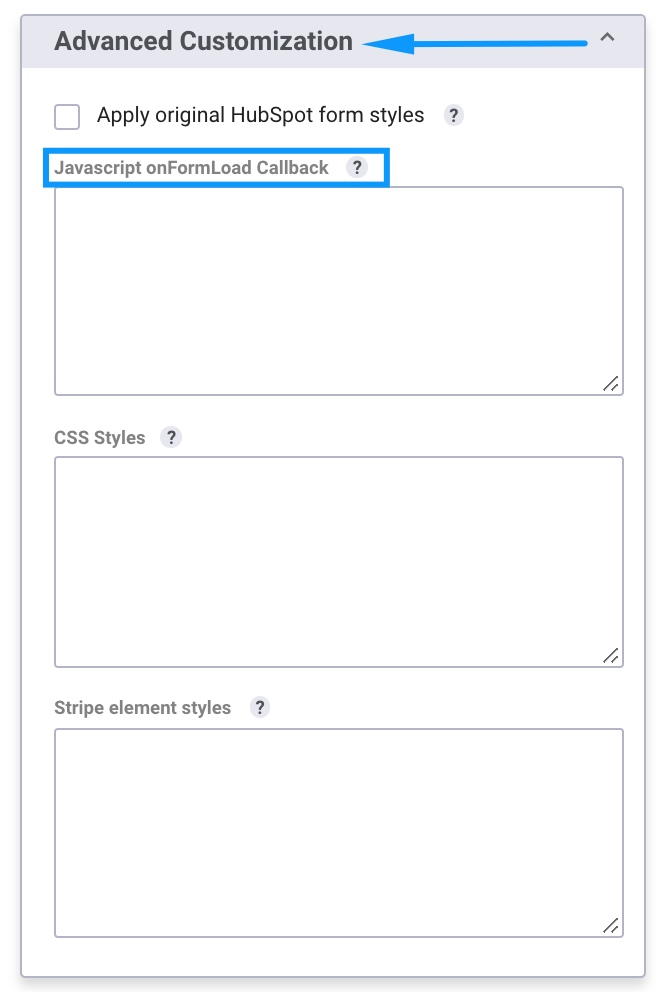
You can attach Javascript callbacks to your form, right in your form builder.
From your form builder, scroll to Advanced Options and add your code in Javascript onFormLoad Callback
Adding Other Callback Functions
You can attach more callbacks to your embed code. To add more callbacks, you can use one of the three following callback functions:
onFormReady – Executes after the form has been rendered. This callback can be set from the Form Builder.
This is perfect for any logic that needs to execute when the form is loaded on the page (e.g. hide/add elements, add new event listeners, etc).
onFormSubmit – Executes after the form is validated, just before the data is actually sent. This is for any logic that needs to execute during the submit. To stop form submit – return false.
onFormSubmitted – Callback that executes after the form is being submitted to the server. This can be used to send analytics events.
To attach a callback, pass the function to a `callbacks` parameter in the embed code.
Example:
DepositFixForm.init({
        portalId: '4832819',
        formId: 'dff2752c-7d81-4f08-8e00-41ca3b664326',
        callbacks:{
            onFormReady: function(){
                //Form is loaded
            },
            onFormSubmit: function(data){
                //Form has been validated but not submitted yet
            },
            onFormSubmitted: function(data){
                //The form has been submitted
            }
        }
    });