You can use DepositFix to create custom deal properties in HubSpot. This allows you to specify any custom property that you want to be set in a Deal when the Deal is created.
Prerequisites:
Before being able to assign value to a property, the property must be created in HubSpot, in the Deal Properties section. Here's how you can manage properties in HubSpot,
The Deals integration must also be enabled in DepositFix's dashboard, here's how you can enable this integration.
Important: When creating a new property, the field type should ideally be a single-line text or number type, to avoid running into any problems when saving sending information to HubSpot.
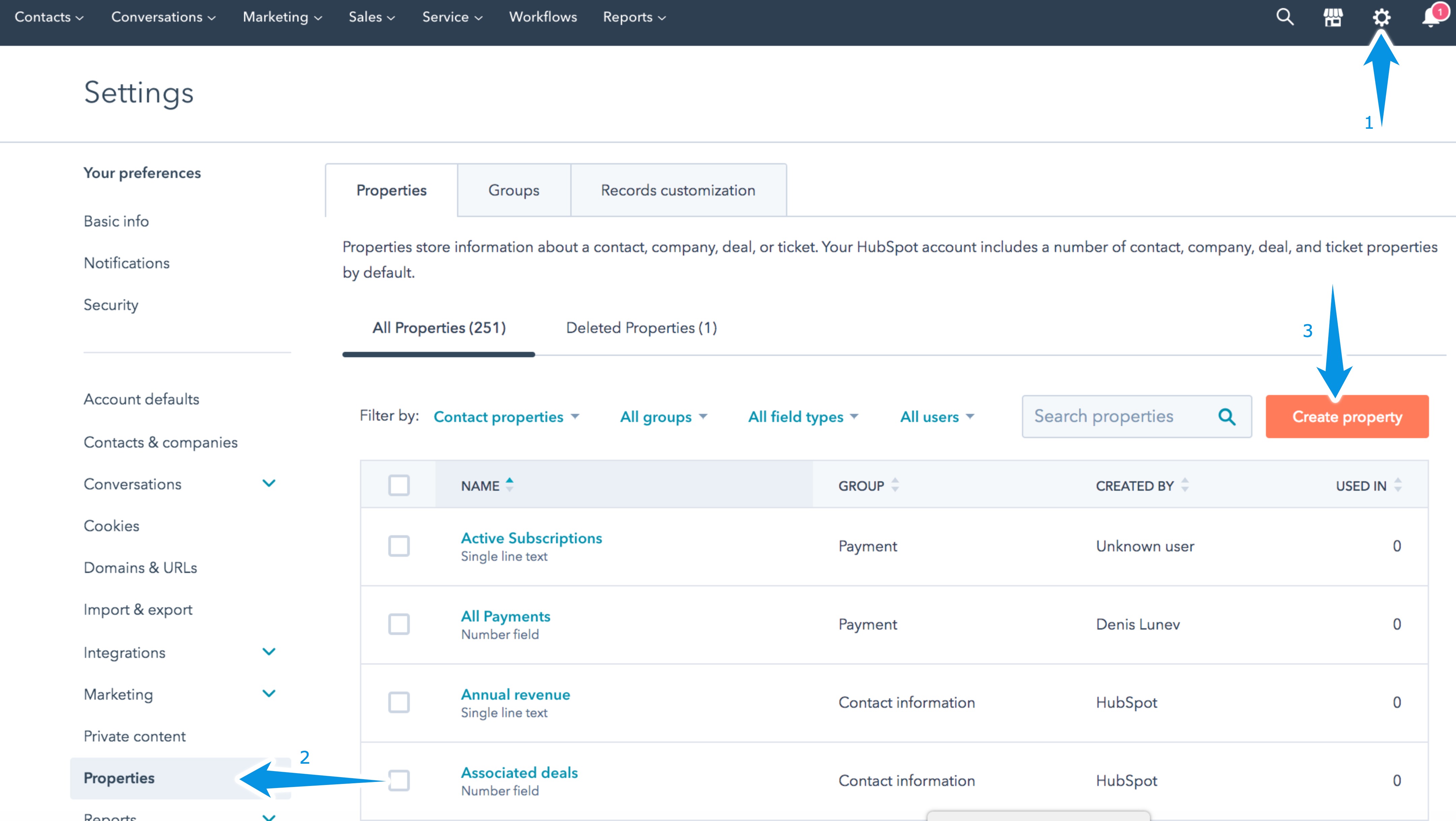
- In your HubSpot dashboard, click on the Settings Icon
- Click on Properties
- Click on Create Property
4. Set the Object type to "Deals", and the Group to "Deal Information".
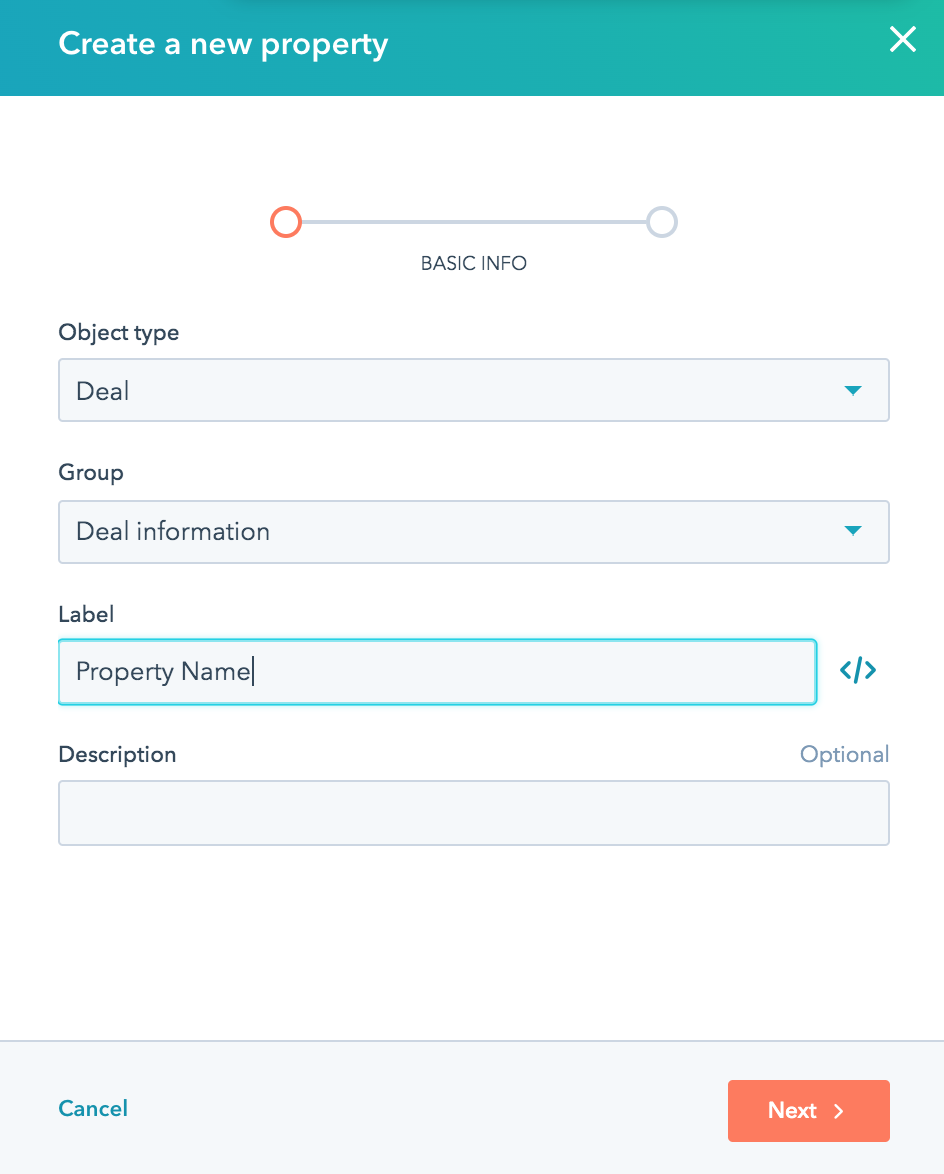
Once you have created the custom properties in HubSpot, you can now use them in your DepositFix form.
Static Deal Properties:
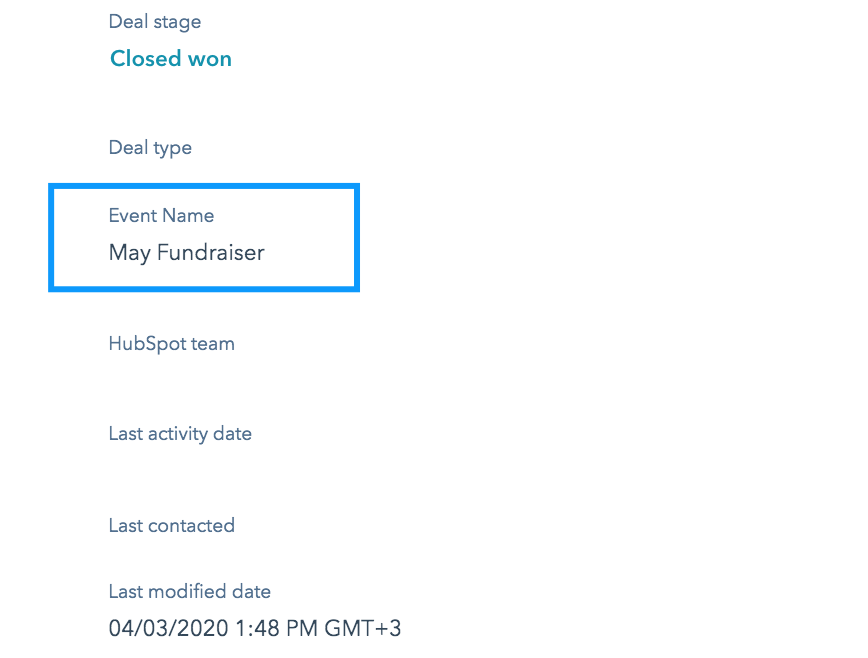
You can use static deal properties when you want to a static property to your deal, meaning that the value of the property will always stay the same for every form submission. For example, "Event Name".
When adding a static property, we need to hardcode the value of the property. To do that, we need to add the following code to your DepositFix form embed code:
customDealProperties: {
    "property_name_1": "property 1 value",
    "property_name_2": "property 2 value",
     ...
}
Where property_name_1 is the name of the custom property in HubSpot, and property 1 value, is the value we want to assign to this property.
Here's what the sample full code would look like:
<script src="https://widgets-test.depositfix.com/v1/app.min.js"></script>
<script type='text/javascript' id='df-script'>
  DepositFixForm.init({
    formId: 'dffbc4d1-192b-4490-83c7-3f67365793dd',
    portalId: '4802805',
    customDealProperties: {
      "event_name": "May Fundraiser"
    }
  });
</script>
This code will add "May Fundraiser" to the Event Name property when the deal is created in HubSpot.
Dynamic deal properties:
Similar to any other form element, you can set the custom properties to have dynamic values based on form submission, meaning that the property value is taken from the actual form instead of being hardcoded. For example, "phone number".
When adding a dynamic property, we need to define which form field the value is taken from. To do that, we need to add the following code to your DepositFix form embed code:
callbacks: {
    onFormSubmit: function(data) {
        data.customDealProperties['<deal_property_name>'] = document.querySelector['<form_field_name>'].value;
     }
}
Where property_name is the name of the property in HubSpot, and form_field_name is the field we want to take the value from.
Here's what the sample full code would look like:
<script src="https://widgets-test.depositfix.com/v1/app.min.js"></script>
<script type='text/javascript' id='df-script'>
  DepositFixForm.init({
    formId: 'dffbc4d1-192b-4490-83c7-3f67365793dd',
    portalId: '4802805',
    callbacks: {
      onFormSubmit: function(data) {
        data.customDealProperties['additional_notes'] = document.querySelector('input[name="lastname"]').value;
      }
    }
  });
</script>
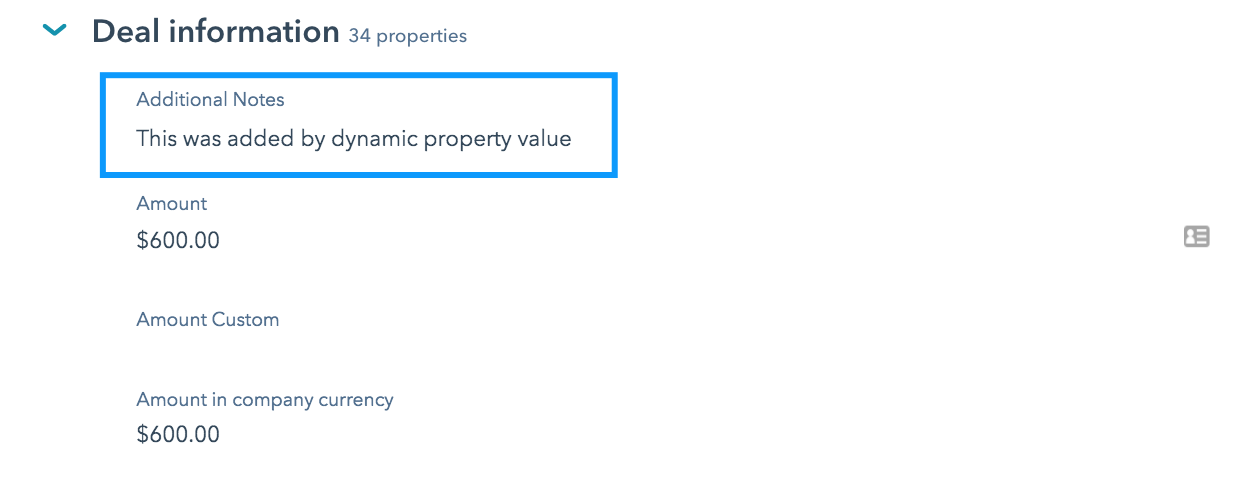
This code will add custom text to the to the additional notes property when the deal is created in HubSpot.
It is very important to have the Deal properties created in HubSpot first and then mapped with the correct property name in DepositFix's embed code, this is to ensure that the transaction does not fail, and all information is saved on HubSpot, and a deal is created.
Setting Custom Pipeline and Stage
By default, DepositFix uses the standard HubSpot values when creating Deals (pipeline and stage). You can change these values, and specify a custom pipeline and stage for your newly created Deals. In order to do that, we need to add the following lines to your DepositFix embed code:
customDealProperties: {
        "pipeline": "PIPELINE_ID",
        "dealstage": "STAGE_ID"
    }
Where PIPELINE_ID is the ID of your desired Pipeline (in HubSpot), and STAGE_ID is the ID of the stage you'd like to set.
The full sample code should look like the following:
<script src="https://widgets.depositfix.com/v1/app.min.js"></script>
<script type='text/javascript' id='df-script'>
  DepositFixForm.init({
    formId: 'dffbc4d1-192b-4490-83c7-3f67365793dd',
    portalId: '4802805',
    customDealProperties: {
      "pipeline": "2020531",
      "dealstage": "2020761"
    }
  });
</script>
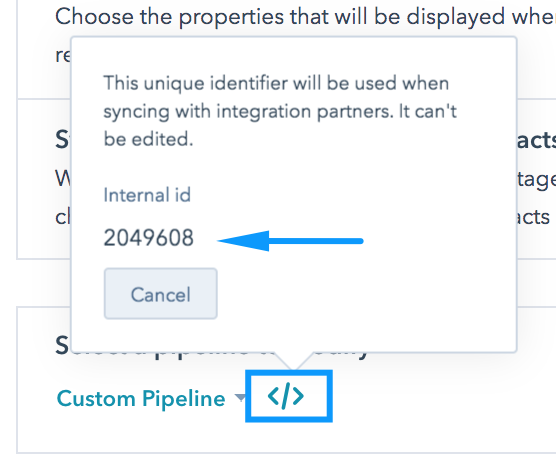
To get the Pipeline ID from HubSpot:
- From your HubSpot dashboard, go to Settings >> Sales >> Deals
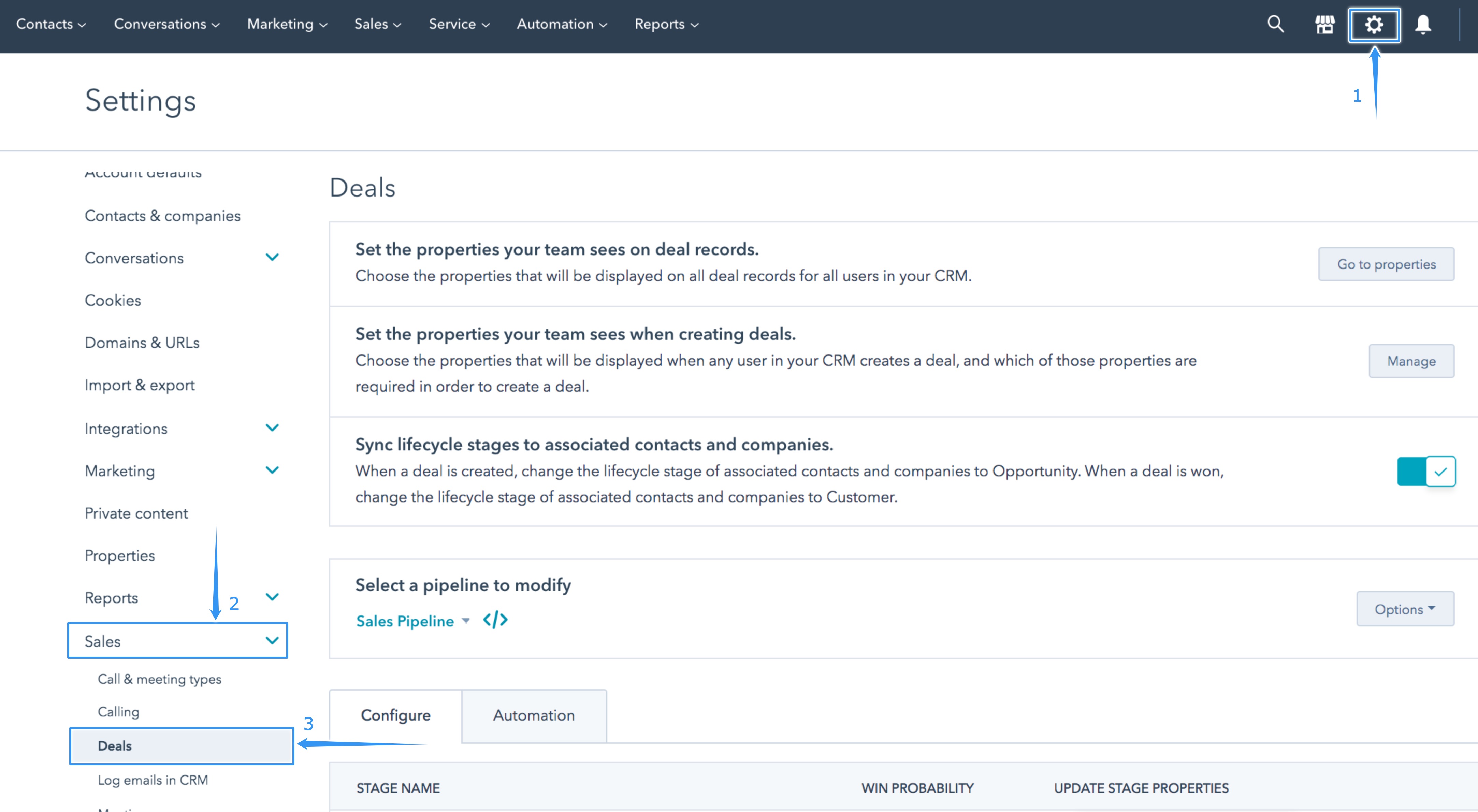
- Select the pipeline you'd like to use, and click on the </> icon, and you'll be able to see the Pipeline ID (note: the ID for custom pipelines is a number ID).
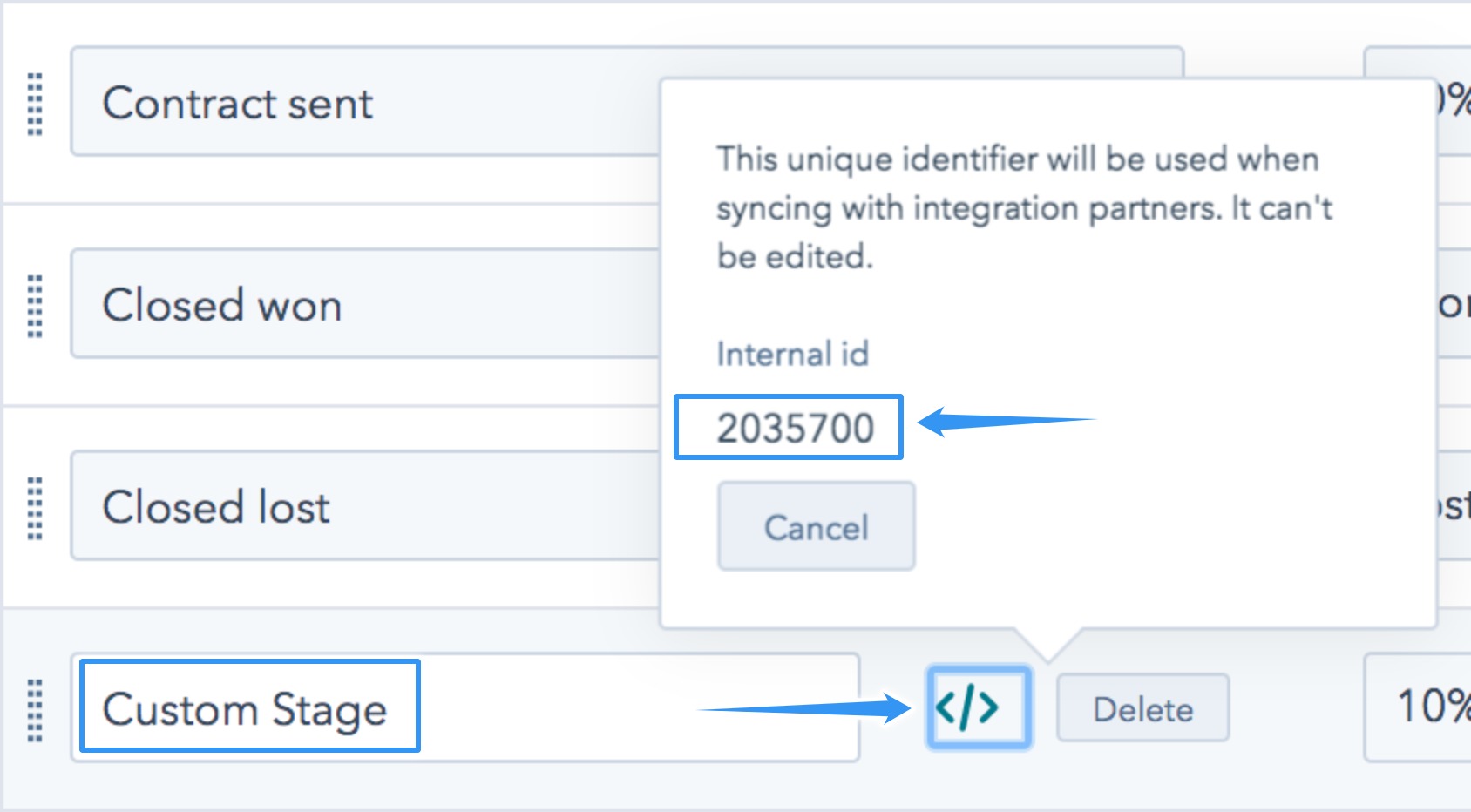
To get the Stage ID from HubSpot:
From the same page, scroll down to find the stage you'd like to use, and click on the </> icon. and you'll see the stage ID.
If you need any further help with setting up custom deal properties, please contact us at support@depositfix.com